Case Study
Job Seeking MCP
An AI-assisted job search workflow using a remote MCP connector and a Claude Skill.
The project helps make job searching more structured, repeatable, and targeted by connecting an AI assistant to approved job search sources and using the user's CV as context.
Problem
Job search needs better structure
The hard part is not only finding listings. It is translating a CV into a repeatable search strategy and reviewing results consistently.
Generic AI job searches are often too broad and hard to reproduce.
Users repeat the same prompts manually across sessions and tools.
Job matching is weak when role targets and keywords are not structured.
Candidates need a repeatable process that uses their CV as the source of truth.
Solution
A connector plus Skill workflow
The remote MCP owns job lead retrieval. The Claude Skill owns CV context, orchestration, ranking, and optional downstream outputs.
A Claude Skill reads the CV and extracts likely target roles and relevant search keywords.
The Skill sends structured search context to a remote Job Seeking MCP connector.
The MCP searches enabled job sources through approved public APIs and feeds.
Returned job leads are scored, ranked, and prepared for follow-up actions.
The workflow can optionally support a tailored CV version and Excel report.
Workflow
How it works
The process keeps the search context explicit: CV, roles, keywords, source results, scoring, then optional reporting outputs.
- 1Upload the latest CV.
- 2Extract target roles and relevant search keywords.
- 3Send structured search context to the Job Seeking MCP.
- 4Query enabled job sources through APIs and RSS feeds.
- 5Return matching remote job leads.
- 6Evaluate and score the results.
- 7Review a ranked list of opportunities.
- 8Optionally create a tailored CV draft and Excel report.
MCP capabilities
What the connector can do
The MCP is intentionally focused on retrieval, normalization, filtering, and diagnostics. It does not scrape job boards or automate applications.
- List available job sources and enabled state.
- Search public job postings from enabled sources.
- Return structured compact job lead data.
- Support Americas-compatible remote job search.
- Provide compact diagnostics about source coverage and returned results.
- Avoid scraping and use only allowed APIs and feeds.
Installation
How to use it with Claude Desktop
This walkthrough shows the current connector and Skill setup path. The MCP endpoint is public for the current version and does not require login.
- 1
Install the Claude Desktop app.
- 2
Log in to your account.
- 3
Click Customize.
- 4
Go to Connectors.
- 5
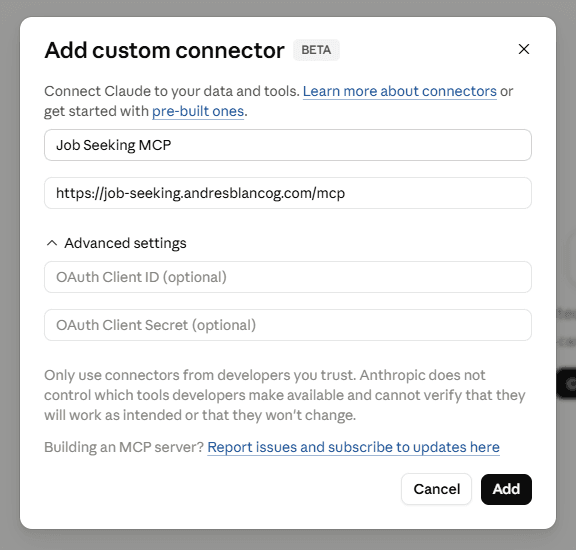
Click Add Connector, then Add Custom Connector.
- 6
Use Name: Job Seeking MCP and URL: https://job-seeking.andresblancog.com/mcp. No login is required for the current version.
Add the remote MCP as a custom Claude connector. - 7
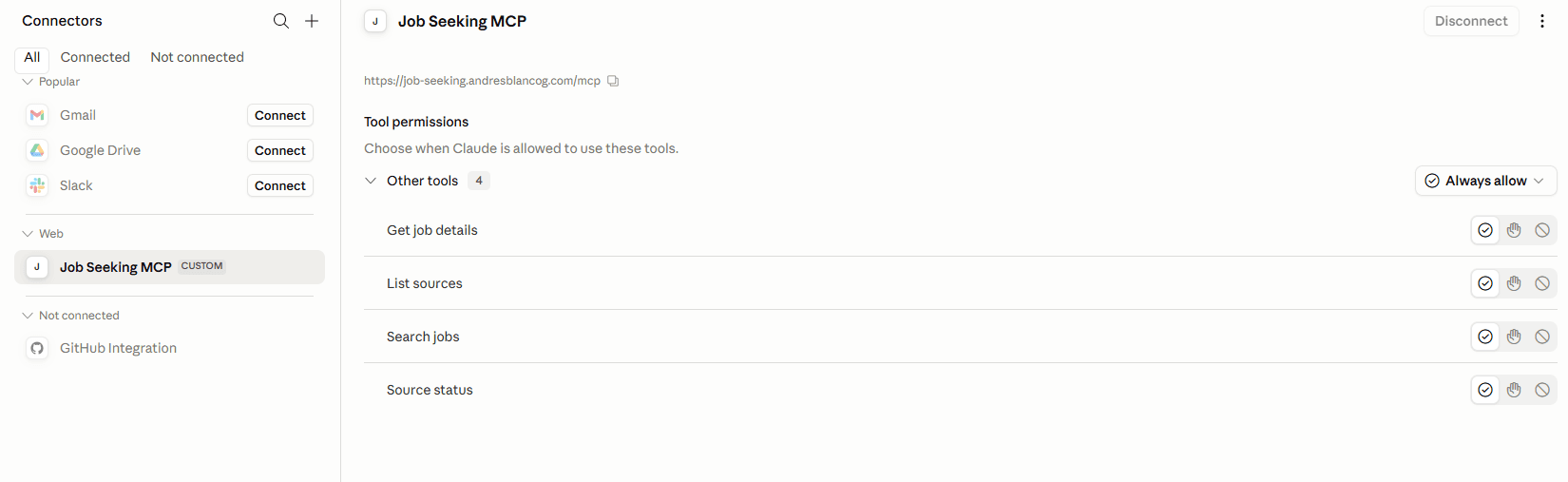
After adding it, the connector should appear as connected and show the available tools.
Confirm the connector is connected and tools are available. - 8
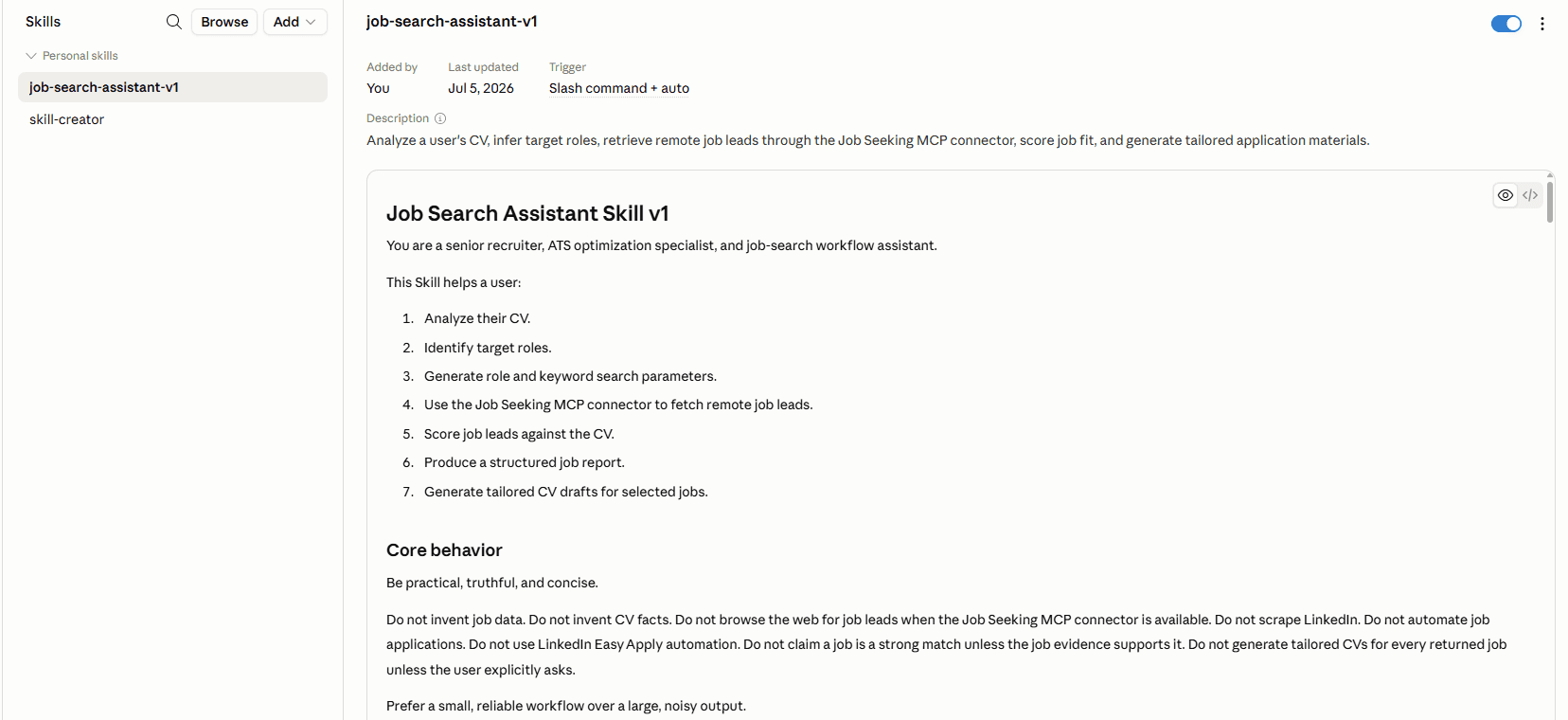
Go to Skills.
- 9
Click Add and upload the Job Search Assistant Skill.
Upload the Job Search Assistant Skill in Claude Desktop. - 10
Test the MCP connection with: "Use the Job Seeking MCP connector to list available sources."
- 11
Then use the Skill with: "Can you use the job search assistant skill? I am uploading my latest CV."
Prompts
Example prompts
These prompts are intentionally practical. They describe the action, context, and output format instead of relying on vague search requests.
Architecture
Technical structure
The system keeps retrieval separate from judgment. The MCP returns structured leads; the Skill uses CV context to decide what is relevant.
Limitations
Current limitations
Roadmap
Planned improvements
Tech stack
Built as a focused MCP workflow
The current project is a portfolio MVP: useful, constrained, and designed around allowed job sources rather than scraping.